Universal Touch Screen Adapter Car Solutions
id: 818805
Universal Touch Screen Adapter Car Solutions
Overview
Description
Specifications
Delivery
Payment
Warranty
USD 130.00
Notify
when in stock
when in stock
Overview


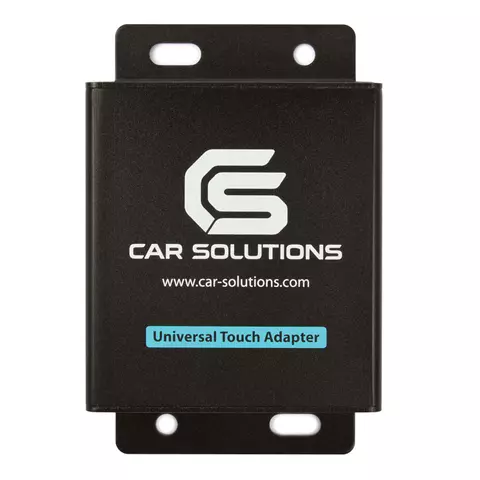
0.3 kg Warranty: 12 months
Universal touch screen adapter Car Solutions NAV2NAV enables connected navigation box manipulation by OEM controls (OEM monitor touch screen display, control buttons). Read more
Description
Universal touch screen adapter Car Solutions NAV2NAV enables connected navigation box manipulation by OEM controls (OEM monitor touch screen display, control buttons). When NAV2NAV universal touch screen adapter is installed all OEM functions are preserved, sound is reproduced by OEM stereo system.
Compatible Navigation Boxes
- Phantom SPT-100
- Phantom SPT-200
- WEG-160
- HT9200
- GVN 53
- GVN 54
- KNA G421
- Mircom M500 (Kenwood protocol)
Compatible Car Models
Compatible Mazda Models
| Mazda model | Model years |
|---|---|
| CX-7 | - |
| CX-9 | - |
Compatible Toyota Models
| Toyota model | Model years | Compatibility conditions |
|
|---|---|---|---|
| From | To | ||
| Allex | 2001 | 2006 | *1 or *8 |
| Allion | 2004 | 2006 | *4 |
| Alphard | 2002 | 2005 | *1 or *8 |
| Altezza | 2001 | 2005 | *6 |
| Aristo | 2001 | 2005 | *4 |
| Avalon Limited | 2001 | 2009 | *6 |
| Avalon XL | 2001 | 2009 | *6 |
| Avensis | 2003 | 2007 | *7 |
| Brevis | 2001 | 2007 | *4 |
| Caldina | 2003 | 2007 | *4 |
| Camry | 2001 | 2006 | *4 |
| Celica | 2001 | 2006 | *6 |
| Century | 2001 | 2007 | *1 or *8 |
| Corolla Runx | 2002 | 2006 | *1 or *8 |
| Corolla Spacio | 2001 | 2007 | *1 or *8 |
| Crown | 2001 | 2009 | *2 or *3 |
| Estima | 2000 | 2006 | *1 or *8 |
| Gaia | 2001 | 2004 | *8 or *1 |
| Grand Hiace | 1999 | 2002 | *1 or *8 |
| Granvia | 1999 | 2002 | *1 or *8 |
| Harrier | 2000 | 2009 | *4 |
| Highlander | 2004 | 2007 | *8 or *1 |
| Highlander Hybrid | 2006 | 2007 | *8 or *1 |
| Highlander Hybrid Limited | 2006 | 2007 | *8 or *1 |
| Highlander Limited | 2004 | 2007 | *8 or *1 |
| Highlander Sport | 2006 | 2007 | *8 or *1 |
| Toyota model | Model years | Compatibility conditions |
|
|---|---|---|---|
| From | To | ||
| Ipsum | 2001 | 2007 | *1 or *8 |
| Isis | 2004 | 2005 | *1 or *8 |
| Kluger / Kluger V | 2000 | 2007 | *2 |
| Land Cruiser | 2000 | 2009 | *1, *2, *8 |
| Land Cruiser Prado | 2000 | 2009 | *1, *2, *8 |
| Mark II Wagon Blit | 2001 | 2007 | *2 |
| Mark X | 2004 | 2006 | *3 |
| Nadia | 2001 | 2003 | *1 or *8 |
| Noah | 2001 | 2007 | *1 or *8 |
| Origin | 2000 | 2001 | *6 |
| Porte | 2004 | 2006 | *1 or *8 |
| Premio | 2004 | 2006 | *4 |
| Previa | 2001 | 2006 | *8 or *1 |
| Prius | 2000 | 2009 | *1 or *8 + *9 |
| Progres | 2001 | 2007 | *6 |
| Pronard | 2000 | 2003 | *6 |
| Raum | 2003 | 2006 | *8 or *1 |
| Reiz | 2005 | 2007 | *3 |
| Regius | 1999 | 2002 | *1 or *8 |
| Sienta | 2003 | 2006 | *8 or *1 |
| Verossa | 2001 | 2004 | *2 |
| Vista / Vista Ardeo | 2001 | 2003 | *7 |
| Voxy | 2001 | 2007 | *1 or *8 |
| WiLL Cypha | 2002 | 2005 | *1 or *8 |
| Windom | 2001 | 2006 | *5 |
| Wish | 2003 | 2009 | *8 or *1 |
Compatible Lexus Models
| Lexus models | Model years | Compatibility conditions |
|
|---|---|---|---|
| ES | 240 | ~2010 | *3 + *9 |
| 300 | - | *5 | |
| 330 | - | *5 | |
| 350 | ~ 2009 | *3 | |
| GS | 300 | ~2009 | *2 + *9 +*4 |
| 350 | ~2009 | *2 + *9 | |
| 400 | ~2009 | *2 + *9 +*4 | |
| 430 | ~2009 | *2 + *9 +*4 | |
| 450h | 2013 | *2 + *9 | |
| 460 | ~2009 | *2 + *9 | |
| GX | 460 | 2009-2010 | *8 or *1 |
| 470 | ~2009 | *1 or *8 | |
| IS | CV | ~2009 | *3 |
| F | ~2010 | *3 | |
| 200 | - | *6 | |
| 220 | ~2009 | *3 | |
| 250 | ~2009 | *3 | |
| 250c | ~2009 | *3 | |
| Lexus models | Model years | Compatibility conditions |
|
|---|---|---|---|
| IS | 300 | - | *6 |
| 300 SportCross | - | *6 | |
| 350 | ~2009 | *3 | |
| 350c | ~2009 | *3 | |
| LS | 400 | - | *4 |
| 430 | - | *4 | |
| 460 | ~2009 | *2 +*10 | |
| 460L | ~2009 | *2 +*10 | |
| 600hL | ~2009 | *2 +*10 | |
| LX | 470 | - | *1 or *8 |
| 570 | ~2009 | *2 +*10 | |
| RX | 300 | - | *4 |
| 330 | - | *4 | |
| 350 | ~2009 | *4 | |
| 400h | - | *4 | |
| SC | 430 (Soarer) | - | *5 |
Touch Screen Adapter Compatibility Conditions
| No | Navigation box | OEM navigation modules location | Additional notes |
|---|---|---|---|
| 1 | With external navigation box |
In front of the passenger seat. | - |
| 2 | In the glove box. | ||
| 3 | Under multi display (behind the false panel). | ||
| 4 | In the trunk compartment (behind the right or left panel). | ||
| 5 | In the trunk compartment (at the top under shelf in the centre). | ||
| 6 | In the trunk compartment (under the panel) . | Additional installation of touch screen panel and touch screen USB controller / operation by remote control. | |
| 7 | Under the front passenger (driver) seat. | ||
| 8 | Under the driver seat. | - | |
| 9 | - | Cars without embedded OEM navigation are supported. | |
| 10 | With navigation on HDD, with built-in PARK ASSIST system. |
Manuals
- Download adapter installation diagram in Toyota / Lexus cars up to 2007 MY
- Download adapter installation diagram in Mazda cars
- Download adapter installation diagram in Toyota / Lexus cars of 2007-2009 MY
- Download adapter installation diagram In Lexus cars with HDD after 2008 MY
Conditions of Use
This adapter is compatible with your car if it is equipped with OEM navigation system and colour touch screen display.
If you have questions concerning this product or want to share your experience of its installation or application, visit our forum.
*Product package content and appearance may differ from those presented on the website and depend on video interface version. Please, ask sales manager before purchase.
All rights reserved. This material from car-solutions.com web site may not be published, rewritten or redistributed in whole or part without authorship indicated and backlinks provided.
Specifications
| Controller is compatible with the following models of Cars |
|
| Functions |
|
Delivery
Payment
Warranty